
You can sign up with Spin City in less than 60 seconds. All you need is a valid phone number and password, and you’re good to go. SMS verification is mandatory to register at Spin City. This guide explains how to join the casino, log in, and fix common registration issues.
How to Register at Spin City Zimbabwe?
Opening a Spin City account requires less than a minute. Follow the guidelines below to register for Spin City on your mobile device.
Step 1: Launch Spin City.co.zw Sign Up Website

Click any Spin City banner on this page. This leads you straight to the operator’s official website.
Step 2: Click the JOIN Button from the Menu
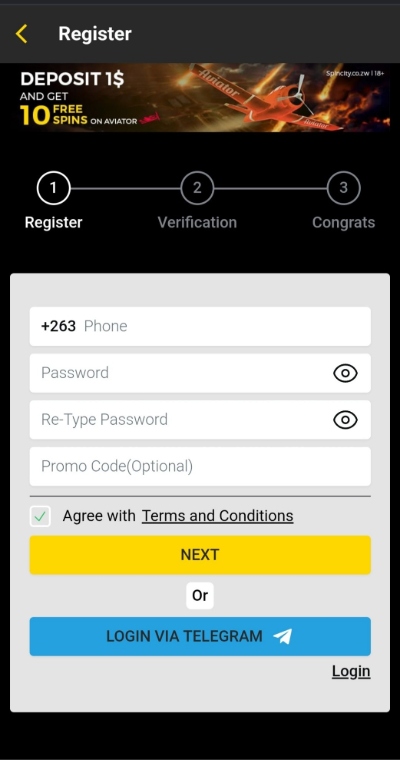
Click the yellow “Register” button in the top right corner. Provide your phone number and password on the registration form. Check the small white box to confirm that you agree with the operator’s Terms and Conditions. Click “Next”. As you can see in the image below, you can also register via Telegram.
Step 3: Verify Your Phone Number
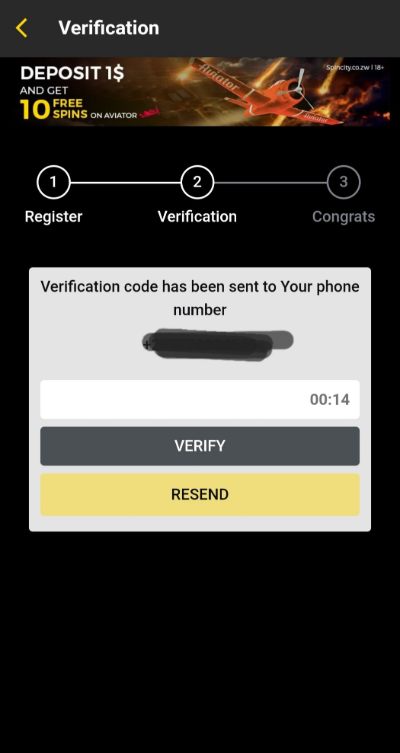
A verification code is immediately sent to your mobile number. Enter it in the space provided on the screen. Click “Verify”. If, by any chance, you don’t receive the code within 15 seconds, click “Resend”. But usually, it comes swiftly unless you enter the wrong phone number.
Step 4: Log In
Just like that, your Spin City account is all set up. This is step 3, where the site congratulates you on your new account. You’re automatically logged in.
How to Activate a Spin City Account
Let’s talk about how to activate a Spin City account. After you register with the site, you’re expected to verify your age to prove you’re not under 18 years old. You do this by uploading a copy of your ID, driver’s license, or valid passport.
While you can deposit funds soon after Spin City registration in Zimbabwe, you must complete identity verification within 72 hours of making a deposit. According to the terms and conditions, if you fail to do so, Spin City can freeze your account. Once your deposit reflects, you can unlock the welcome bonus. A $1 deposit will suffice to unlock the welcome deal.
Spin City ZW Login Process
It doesn’t take much to log in to Spin City Zimbabwe. In fact, you only need your phone number and password to log into your account. Follow the steps below.
Step 1: Go to the Spin City Website

Spin City login registration can take place via your desktop or mobile device. Launch your mobile browser to log in with your phone. Type Spin City in the address bar to open the website.
Step 2: Click Login
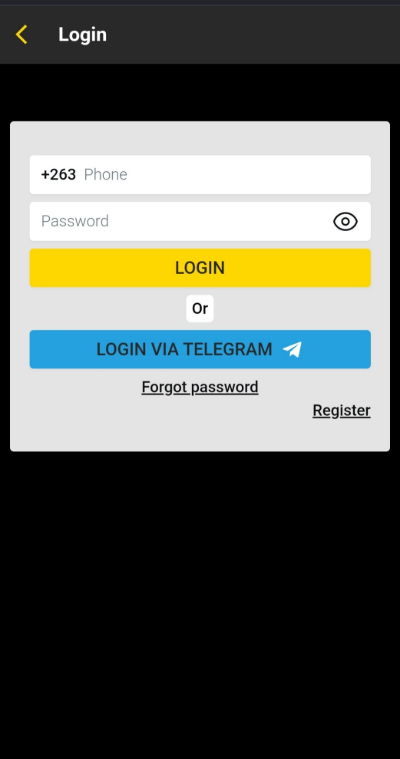
You’ll see a LOGIN tab right at the top, highlighted in yellow. Click on it to reveal the Spin City Zimbabwe login page as shown in the image below. Enter the phone number and password you used to register. Click “Login”.
Step 3: Log in to your Spin City account
You’re logged into your Spin City account right away. If you save your password after registration, the site remembers your login credentials. They’re pre-entered each time you point your cursor to the login page. From there, you hit log in, and you’re in, saving time.
What is the Spin City Registration Bonus for New Players?
When you Spin City register online, you’re entitled to a welcome bonus to kick things off. The offer is strictly for new users. If you deposit as little as $1, you get 10 free spins to use on Avrika. This is a new crash game designed by B5G, and very much similar to Aviator.
Note that you can’t play with these free spins from the Spin City welcome bonus on any other game. You must use them up within 5 days from the time they credit your account. If not, Spin City will permanently remove them from your account.
Facing Challenges Registering or Logging In? Here Are Some Solutions
Is it easy to Spin City sign up? Absolutely. Will you encounter any registration or login issues along the way? Most probably. The good news is it’s usually nothing you can’t fix. Below are a few possible curveballs and solutions.
Phone Number Already Taken
You can’t register using a phone number that has already been used to set up a Spin City account. An error message will pop up notifying you that the number is taken. This restriction is in place to avoid bonus abuse.
Incorrect Phone Number
Double-dipping aside, you won’t receive the verification code if you submit an incorrect mobile number. Double-check that you didn’t miss or mix up any digits.
Wrong Password
You can’t log in if you enter the wrong password. If you forget your Spin City register Zimbabwe password, go to the login page and click “Forgot Password”. Enter the 5-digit password reset code sent via SMS on the screen provided. Provide a new password and follow the prompts.
Account Frozen
As mentioned, Spin City reserves the right to freeze your account if you fail to verify your ID within 72 hours of your first deposit. Contact the support team for the way forward.
Register with Spin City Register in 1 Minute
You’re less than a minute away from playing if you decide to Spin City register. The operator’s 3-step sign up process is super quick and requires minimal details to get you in. You must complete phone verification to set up your account. Ultimately, joining Spin City is a breeze. Why not try it for yourself?
-
 Spin CityDeposit $1 Get 10 Free Spins

Spin City Register Guide FAQs
-
Can I register with Spin City using my phone?
-
How old do I need to be to play at Spin City?
-
How long does it take to verify your ID at Spin City?
-
Can I open a second Spin City account?