
If you just joined MWOS, you can deposit money using Innbucks and start betting right away. The betting site also processes withdrawals via the same platform for your convenience. To initiate a MWOS Innbucks transaction, you need to register with both MWOS and the popular mobile wallet.
We tested the deposit and withdrawal processes at MWOS. Our guide details the exact steps to transact with Innbucks, including screenshots to assist first-timers. We’ll also highlight Innbucks transaction limits, processing timelines, and potential delays to watch for. Lastly, we discuss how safe it is to use Innbucks for online betting transactions at MWOS.
-
 MWOS100% up to $500

Does MWOS Accept Innbucks in Zimbabwe?
Our MWOS review confirms that the betting site allows users to deposit money using Innbucks. You must be registered with Innbucks for this to happen. You do this by downloading the Innbucks app and following the registration prompts. Alternatively, you can dial the USSD code *569# on your mobile and follow the instructions. Then you must set up an account with MWOS and provide the phone number registered with Innbucks.
MWOS Innbucks minimum deposit limits are quite low. The lowest you can deposit is $1. You can’t deposit any amount less than that. You’re prompted to authorize the transaction through your Innbucks app. Or you can manually submit an authorization code generated by Innbucks or scan the QR code. Your money is transferred straight from your Innbucks wallet to your MWOS betting account. There’s no need to go via a third party.
You can also withdraw directly from your betting account to your Innbucks mobile wallet. The minimum you can withdraw is $5. That’s the minimum withdrawal amount across all MWOS online payment platforms.
How to Deposit on MWOS Using Innbucks – Step-by-Step Process
As mentioned, MWOS Innbucks deposits are only possible for registered account holders. Assuming you’ve joined MWOS and downloaded the Innbucks app on to your phone, follow these steps.
1. Log in to MWOS
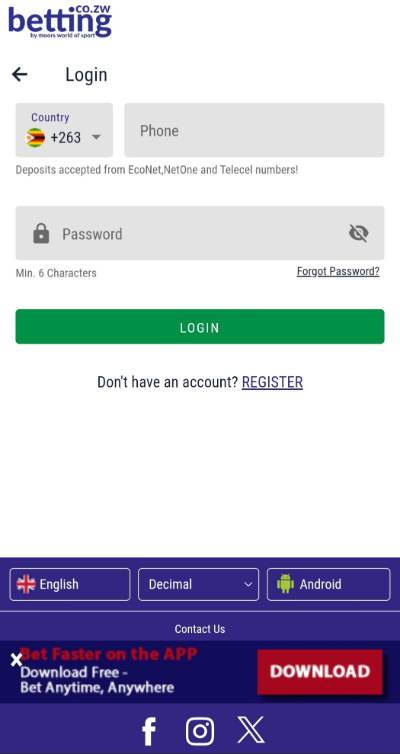
You start by logging into your MWOS betting account. To do this, visit the MWOS website, click on Login, and fill out your phone number and password. Click on the green Login tab to sign into your MWOS betting account. Remember that this phone number must be registered with Innbucks.
2. Go to Deposits
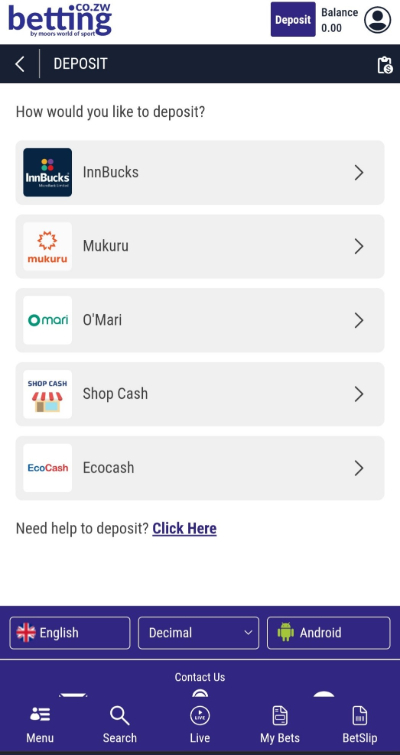
Once logged in, click on the Deposit button at the top highlighted in blue. You’ll see the various payment methods supported by MWOS displayed in a horizontal fixed carousel.
3. Select Innbucks
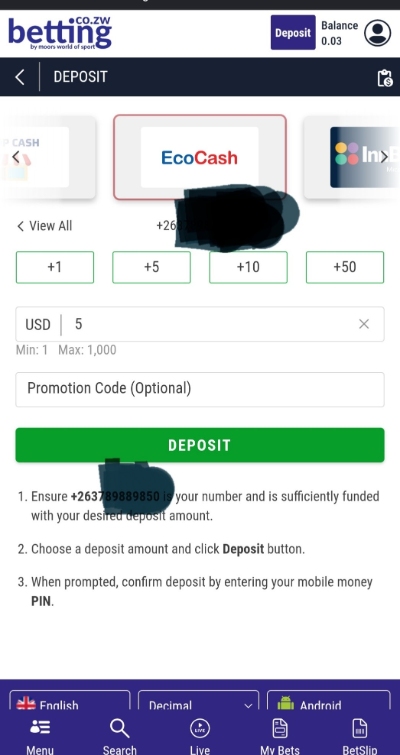
Swipe across the available options or use the arrows until you get to Innbucks. You know you’re on the right payment option when a red border appears on Innbucks.
4. Enter amount
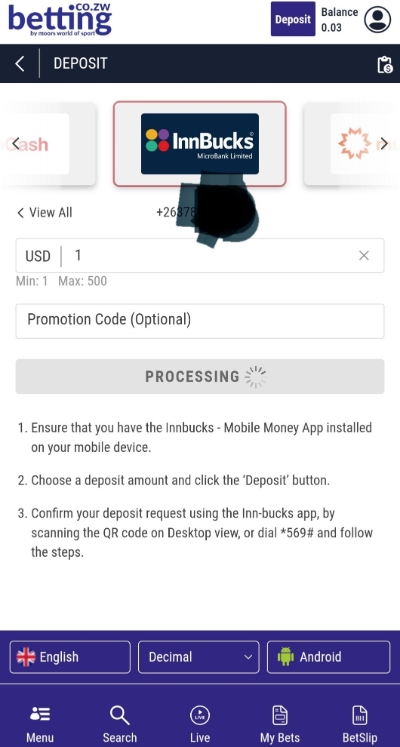
You’ll notice a field that requires you to add the amount you want to deposit. You’re allowed to deposit anything from $1 to $500 in one transaction. As soon as you enter the amount, the green Deposit tab is activated. Click on it.
5. Confirm on phone
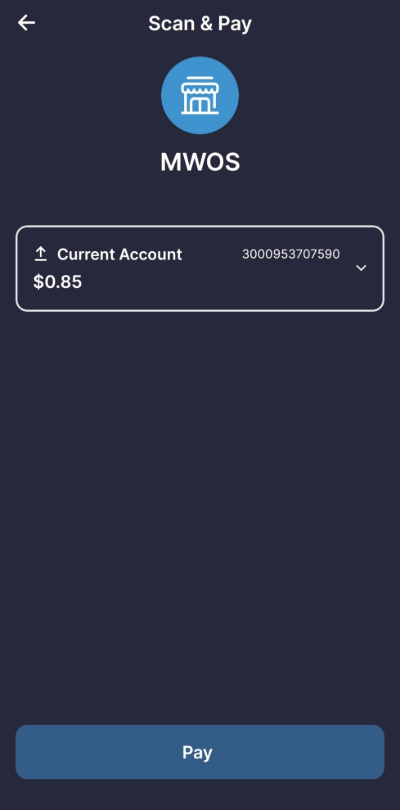
An authorization code is displayed on the site. You can enter the code manually via USSD to authorize the payment, scan the QR code displayed or continue with the Innbucks app.
We went the app route and were prompted to enter an Innbucks 6-digit PIN. You’re then automatically led to the Scan & Pay page. You’ll see MWOS displayed on the screen as shown in the image below. Click “Pay” at the bottom to confirm the transaction.
7. Funds reflect
A message pops on the screen confirming that your deposit was successful. The amount you deposited is moved directly from your Innbucks wallet and updated to your MWOS betting balance almost instantly. MWOS Innbucks deposits are free.
Moors World of Sport Innbucks Deposit Limits
We mentioned that MWOS is among the $1 deposit betting sites that allow you to deposit as little as $1 using Innbucks. If your pockets allow, you can deposit up to $500 in one go. That also happens to be the daily transaction limit. That means you can deposit up to $3,500 weekly.
The same limits apply to players depositing with MWOS for the first time as well as returning users. You can’t adjust the deposit limits upwards even if you’re a regular player. Innbucks transactions are predominantly processed in USD, and therefore, deposit funds are retrieved from your Innbucks current account.
Can You Withdraw from MWOS via Innbucks?
At the start of our guide, we mentioned that MWOS accepts both Innbucks deposits and withdrawals. In short, you can withdraw winnings directly from your MWOS betting account into your Innbucks wallet. The funds are deducted straight from your betting balance.
Just make sure the phone number displayed on the Innbucks payment portal is indeed registered with Innbucks. The minimum you can withdraw is $5 per transaction. The maximum is $1,000 per day. MWOS doesn’t automatically conduct verification on withdrawals, except for large or suspicious payouts. In such instances, the MWOS team will advise you of next steps.
How to Withdraw from MWOS – Step-by-Step Withdrawal Process
Below are the steps to withdraw money from your MWOS betting account to your Innbucks wallets.
1. Go to Cashier
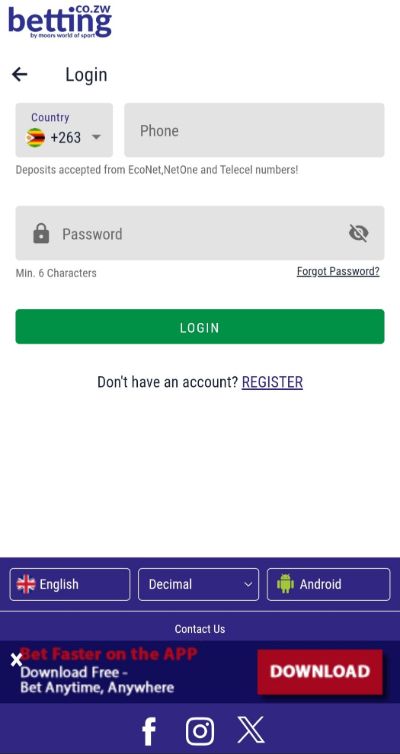
Log in to your MWOS betting account via the login page. You’re required to submit your phone number and password to sign in.
2. Select Withdrawal
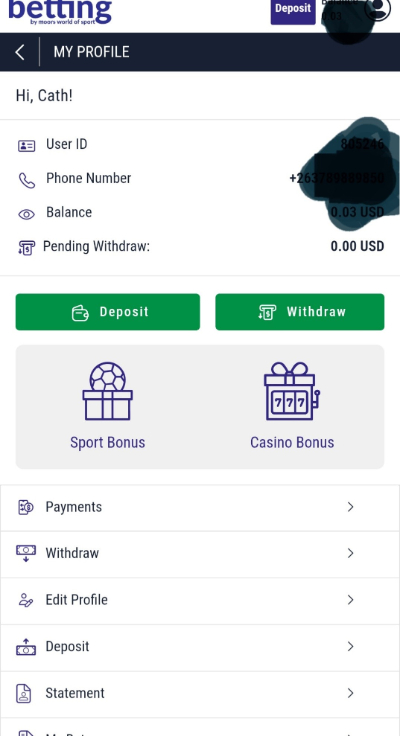
Click on your profile icon in the top right corner. Your account profile is displayed on your screen, showing your user ID, phone number, and withdrawable balance. Click the green “Withdraw” tab just below that.
3. Choose Innbucks
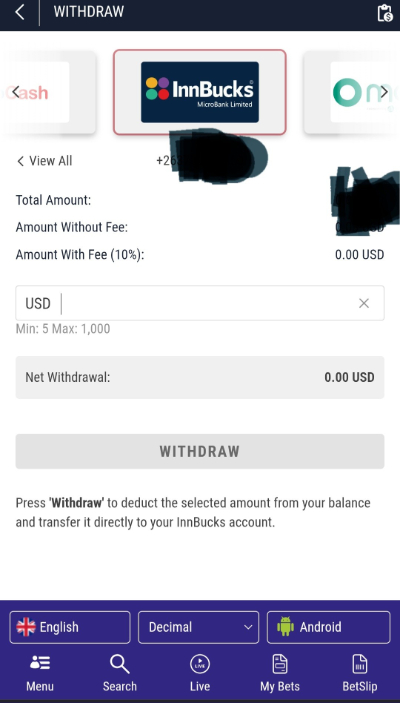
Swipe across the supported payment options until you get to Innbucks. Again, Innbucks will be highlighted by a red border to confirm you’re on the right payment platform.
4. Enter Amount
Submit the amount you want to withdraw in the field provided. Make sure that it’s at least $5 and within the withdrawable balance. MWOS charges you 10% for each Innbucks withdrawal. That means you’re charged $1 to take out $10, as shown in the image below. As a result, your Innbucks balance is credited with $9. Click “Withdraw”.
5. Confirm
The next step is to confirm the transaction. Either scan the QR code that pops up, manually enter the authorization code provided on your screen, or complete the transaction through the Innbucks app.
6. Processing Time
It usually takes a few minutes for the money to reflect in your Innbucks wallet. You don’t need to complete KYC verification to withdraw small amounts.
MWOS Withdrawal Time – What to Expect
MWOS is among the fastest Innbucks withdrawal sites, and you can expect your money to hit your wallet in 15 seconds or less. Once the funds are sitting in your Innbucks wallet, you can withdraw at any Simbisa food outlet like Chicken Inn. Innbucks has also partnered with retail stores like Pick N’ Pay, so you can withdraw from there as well. You’ll need to present your ID to withdraw these funds.
Common MWOS Payment Issues (And Fixes)
We don’t anticipate you’ll regularly face issues when you withdraw money using Innbucks on MWOS. But now and again, technical and human flaws can cause payment anomalies. We’ve mentioned a couple below and how to get around them.
Deposit not reflecting
Your money might not reflect if you provide a mismatched phone number. Make sure that the phone number you registered your MWOS account with is the one registered to Innbucks.
Innbucks PIN issues
Your Innbucks will be locked if you enter the wrong PIN 3 times while attempting to authorize a deposit or withdraw. You’ll need to contact Innbucks and get information on how to recover your PIN.
Insufficient funds
Your deposit won’t be updated if you have insufficient funds in your Innbucks wallet. Similarly, your withdrawal request isn’t processed if there’s not enough withdrawable balance in your betting account.
Is MWOS Safe for Innbucks Users?
MWOS is a prominent betting site in Zimbabwe, fully licensed by the Lotteries & Gaming Board of Zimbabwe. It has the largest retail network of physical betting shops in the country, making it one of the more recognizable Innbucks betting sites.
The betting site doesn’t request to see your Innbucks PIN and has no access to it. It runs on SSL encryption software, so your details aren’t shared with unauthorized parties either. You can authorize transactions safely via the Innbucks app or USSD menu. MWOS insists that you use the same phone number for Innbucks payments that you use during registration to prevent fraud.
Final Verdict on MWOS Innbucks Payments
MWOS is ideal for Innbucks deposits and withdrawals. Your transactions are processed safely, securely, and efficiently. Deposits are instant and free. Withdrawals are also processed right away if there aren’t any verification or network delays.
You can withdraw money with Innbucks without uploading your ID. Verification kicks in for larger withdrawals or if suspicious activity is detected on your betting account. Make sure you have sufficient balance before initiating a transaction, and that your Innbucks and MWOS registration phone numbers match to avoid issues.
-
MWOS100% up to $500